
Quick answer
If you sell goods or services online, or earn from content, ads, affiliates or sponsorships, BIR now requires you to post a Registration Seal Badge on every website, shop and page where you do business. It replaces posting your COR online. Get it free in ORUS (you pay a ₱30 documentary stamp tax) and post it by October 31, 2026.
- Post only the badge online, not your whole COR.
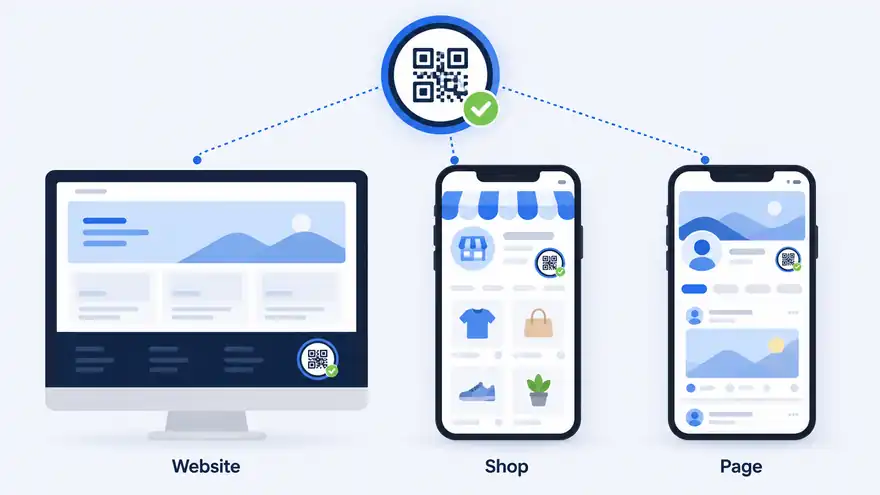
- The badge goes on every online page where you sell or earn.
- Most registered sellers just click Synchronize in ORUS and download it.
- You still need your printed COR at your physical place of business.
- October 31, 2026 is the last day to comply without penalties for non-display.
What changed
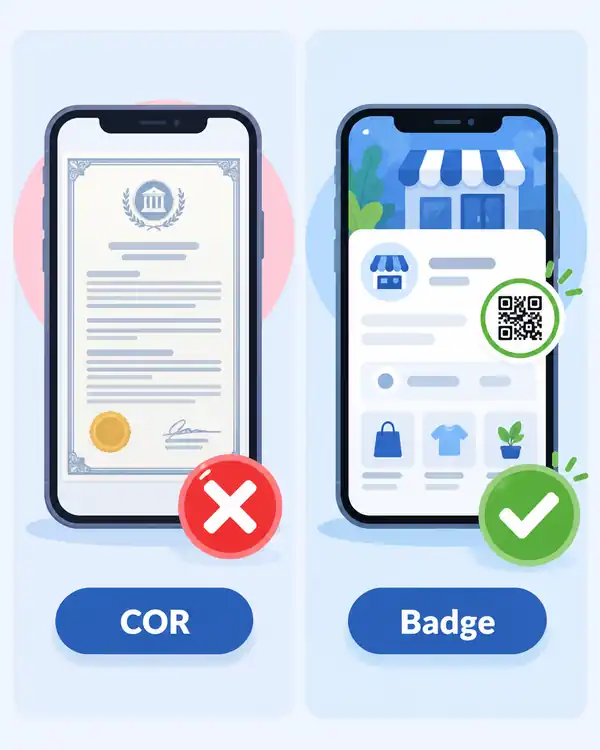
BIR issued RMC No. 38-2026 on April 29, 2026. It created the BIR Registration Seal Badge: a small image with a QR code that proves you are registered.16
Online businesses were already required to show proof of BIR registration under RR 7-2024 and RR 15-2024. Many posted a photo of their COR, which exposed their TIN and registered address (often their home). The badge replaces that. You post the badge online instead of your COR.2614
RMC No. 99-2026 then gave covered taxpayers until October 31, 2026 to display it, without penalties arising solely from not displaying it.48
Who must post it
Anyone selling goods or services through a website, social media or any digital or electronic means. That includes:2
- Online sellers and merchants, including Facebook, Shopee, Lazada and TikTok Shop sellers
- Professionals and service providers who offer services online, such as online tutors and freelancers
- Bloggers, vloggers, live streamers, content creators and influencers
- Anyone earning from online views, ads, affiliate commissions or brand sponsorships
- Websites and e-marketplace platforms themselves
Selling only occasionally is not an exemption. If you earn online, you need to be registered, and if you are registered, you need the badge.211
| Code | Activity |
|---|---|
| PSOC 5990 | Online content creator (individuals registered as professionals) |
| PSIC 47913 | Retail sale via internet |
| PSIC 47911 | Retail sale via mail order |
| PSIC 47912 | Retail sale via telephone order |
| PSIC 85593 | Online tutorial services |
What you need
How to get your badge in ORUS
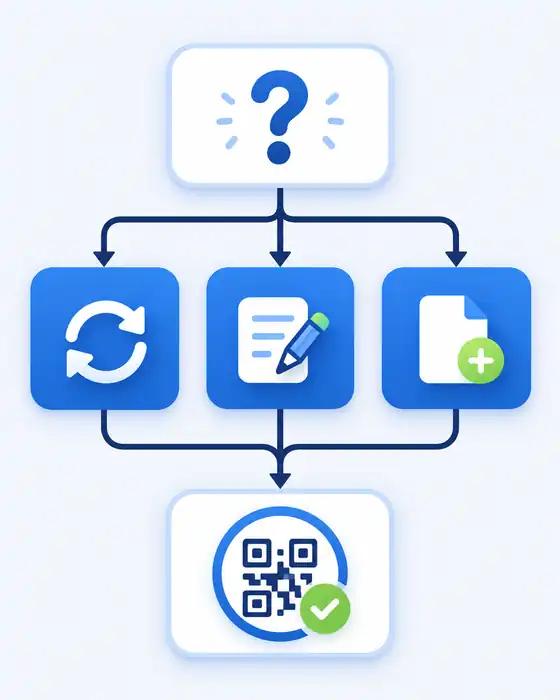
Which path you take depends on your situation. All three end with a COR that has a QR code, plus your badge.35
| Your situation | What to do in ORUS | Cost |
|---|---|---|
| Registered, nothing changed | Profile › Synchronize › Certificates and Permits › download | ₱30 DST |
| Registered, details need updating | Update Information › Correction/Change/Update of Registration › submit › pay › generate COR | ₱30 DST |
| Not yet registered | New Registration › Form 1901 (individual) or 1903 (non-individual) › wait for RDO approval › pay › generate COR | ₱30 DST |
Already registered and nothing changed (most sellers)
This is the simpler route BIR added through RMC No. 64-2026. No registration update needed.513
- Log in to ORUSGo to orus.bir.gov.ph and sign in. If you have no account yet, enroll first.orus.bir.gov.ph
- Synchronize your recordOpen your Profile (the icon at the bottom of the page) and click Synchronize. This updates your registration record.Profile › Synchronize
- Pay the ₱30 DSTPay the documentary stamp tax online through a BIR ePayment channel. Keep your proof of payment.₱30 · ePayment
- Download your COR and badgeGo to Certificates and Permits. Download your latest COR with QR code and your Registration Seal Badge.Certificates and Permits
- Post the badge everywhere you sellUpload the badge image to your website, shop pages and business profiles. Crop it from the document if needed, but don't edit it.Before Oct 31, 2026
- Test the QR codeScan the posted badge with your phone. It should open a page on verify.bir.gov.ph that confirms your registration.1 min

Your COR details need updating
- Log in to ORUS and click Update Information, then Correction/Change/Update of Registration.
- Choose Head Office or Branch, then click Validate.
- Open Information to Update and pick what you need to change, such as your line of business or address.
- Review the Summary page, tick the three boxes and click Submit Application.
- Pay the ₱30 DST through a BIR ePayment channel.
- Return to your ORUS profile and generate your updated COR and badge.
Not yet registered with BIR
Register first. In ORUS, choose New Registration and fill out Form 1901 (individuals) or 1903 (corporations and OPCs). The RDO approves within three working days. Then pay the ₱30 DST and generate your COR. Full walkthrough: BIR registration for online sellers.3
Where to post it
| If you have | Post it on |
|---|---|
| Your own website or app | Any page such as About, Company, Government Compliance or Business Permits |
| A shop or profile on a platform | Your seller or merchant page, profile, store or shop details, marketplace or business page |
| An e-commerce platform or app (operators) | Support, About or App Settings page, under links like Government Compliance or Business Permits |
- Post only the badge. Don't upload your whole COR.
- You can crop, scan or extract just the badge from the document.
- Keep it clear, readable and unaltered. No filters, stickers or redesigns.
- Make it visible and easy for customers to find.
Costs and deadline
| Item | Details |
|---|---|
| Badge | Free |
| Documentary stamp tax | ₱30, paid online when you generate your COR |
| Annual registration fee | None. It was removed in 2024. |
| Deadline | October 31, 2026 |
| After the deadline | Penalties may apply |
Common mistakes
- Posting your whole COR. It shows your TIN and address. Post only the badge.
- Editing the badge. Resizing is fine. Cropping out the QR code, recoloring or adding text is not.
- Wrong industry code. If your COR doesn't show your online activity, fix it in ORUS before you generate the badge.
- Locked out of ORUS. ORUS sends codes to the email on your BIR record. If you lost access, update your email first.
- Posting on one platform only. If you sell on Facebook and Shopee, post the badge on both.
- Waiting until October 31. RDO approvals can take up to three working days if you need a registration update.
How buyers can check a badge
Scan the QR code. It should open a page on verify.bir.gov.ph that confirms the COR is authentic and the registration is valid. If it opens any other website, the badge is fake.210

The badge proves registration. It does not prove the seller is up to date on tax filings.211
FAQ
I only sell on Facebook once in a while. Do I need the badge?
Yes. The rule covers anyone selling through social media or any digital means. Selling occasionally is not an exemption.
Is the badge really free?
The badge is free. You pay a ₱30 documentary stamp tax when you generate your updated COR in ORUS.
Can I just post a photo of my COR instead?
No. BIR says only the badge should be posted online. It replaces the COR so your TIN and address stay private.
My COR has no QR code. Do I have to replace it?
You don't have to replace it for your physical store. But to get a badge, you need to synchronize or update your record in ORUS, which gives you a new COR with a QR code.
I'm a content creator earning from sponsorships. Am I covered?
Yes. Bloggers, vloggers, live streamers, influencers and anyone earning from views, ads, affiliates or sponsorships are covered.
I'm not registered with BIR yet. What do I do?
Register first through ORUS using Form 1901 or 1903. You get your COR and badge after RDO approval and paying the ₱30 DST.
Do I still need to display my COR in my physical store?
Yes. The badge is for online pages. Your printed COR stays posted at your place of business and each branch.
What happens if I don't post it by October 31, 2026?
The penalty waiver under RMC 99-2026 ends, and you may be penalized for failing to post proof of registration.
Official links
Sources
14 sources, 3 from BIR. Checked Oct 13, 2026.
- Revenue Memorandum Circular No. 38-2026: Issuance and posting of the BIR Registration Seal Badge · Bureau of Internal Revenue (official)
- RMC No. 38-2026 full text · Batas Natin
- RMC 38-2026 Annex C: Taxpayer Guide on how to generate Registration Seal Badge in ORUS · Bureau of Internal Revenue (official)
- Revenue Memorandum Circular No. 99-2026: Extension of the period for display of the BIR Registration Seal Badge · Bureau of Internal Revenue (official)
- Revenue Memorandum Circular No. 064-2026 (summary) · Tax and Accounting Center
- Special InTax May 2026, Issue 1, Volume 2 · KPMG Philippines (R.G. Manabat & Co.)
- BIR prescribes mandatory display of Registration Seal Badge for online businesses · P&A Grant Thornton
- Deadline to display BIR registration seal badge extended to Oct. 31 · Inquirer.net
- BIR gives online sellers till Oct 31 to display registration · Context.ph
- BIR Registration Seal Badge: What Creators Must Post · Gadget Pilipinas
- BIR Registration Seal Badge for Online Businesses · Emerhub
- Did You Know? Content Creators Are Now Required to Display Their BIR Seal Badge · Preview
- How to Generate Your BIR Registration Seal Badge in ORUS With No COR Updates (RMC No. 64-2026) · BIR Online Tools
- BIR Registration Seal Badge Deadline Extended: What Online Businesses Need to Know · Permitly